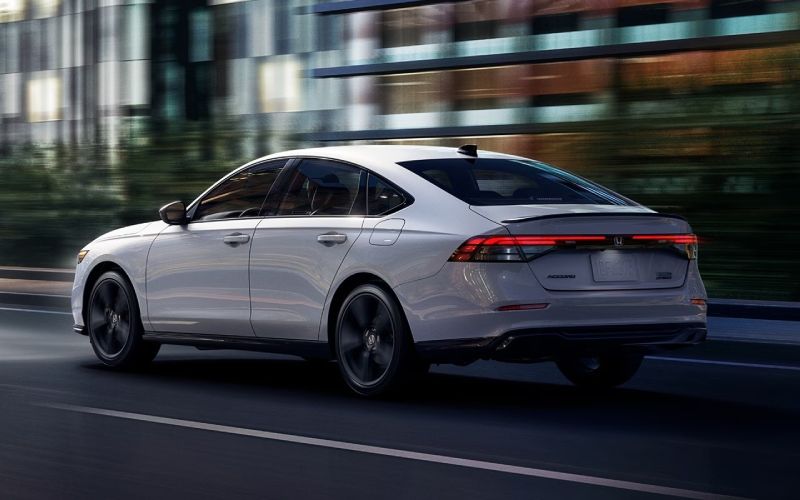
Sharp Honda - Which sedan packs smarter cabin tech for Junction City, KS commutes — the 2026 Honda Accord or the 2026 Toyota Camry?
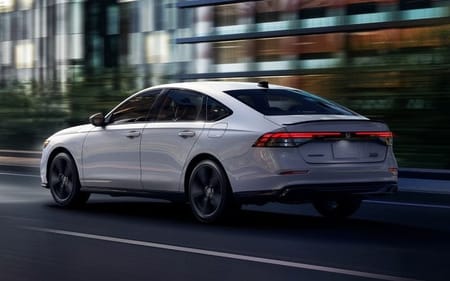
For Junction City, KS commuters who split time between local errands and longer I-70 stretches, in-cabin technology can make or break a daily routine. Two of the most cross-shopped sedans—Honda’s latest Accord and Toyota’s newest Camry—bring a strong mix of screens, voice assistance, and safety displays. But when the question is which one puts smarter, simpler tech at your fingertips every day, the Accord edges ahead with an available Google built-in experience, a wide 12.3-inch touch-screen on hybrid trims, and clear, consistent driver information where you want it.
Here’s a deeper dive into how the cabin tech in each sedan fits routine drives, from a morning school drop to an evening run toward Milford Lake.
Quick take: who wins on everyday tech usability?
Both sedans offer wireless Apple CarPlay® and Android Auto™ and available Head-Up Displays. The Accord’s advantage comes from the way it integrates these elements: hybrid trims center an extra-wide 12.3-inch touch-screen, Touring Hybrid adds Google built-in for native Google Maps and Google Assistant, and controls are laid out with a tidy, low-glare dash. If you rely on voice prompts to dodge a slowdown or add a detour, speaking naturally to Google Assistant without touching your phone is a genuine quality-of-life upgrade.
The Camry counters with Toyota’s latest Audio Multimedia system, plus an available 12.3-inch digital gauge cluster and a Head-Up Display in upper grades. It’s a capable setup with a standard Blind Spot Monitor and thoughtful touches like Traffic Jam Assist. For many drivers, it checks the boxes; for those who want deeper native integration with the Google ecosystem, the Accord’s approach feels more seamless.
Infotainment clarity and navigation confidence
A big screen only matters if it’s readable and responsive. The Accord’s 12.3-inch touch-screen on hybrid trims is extra-wide and easy to parse at a glance. Split-screen views keep maps, audio, and call info simultaneously visible—handy when you’re tracking an exit for Washington Street while fielding a call. On Touring Hybrid, Google built-in lets you use Google Maps without pairing your phone, and maps can surface in the instrument cluster or be supported by the available Head-Up Display for simpler lane guidance. App updates arrive through Google Play, so your navigation and preferred media services stay current without fuss.
The Camry’s system is polished and supports cloud-based features. It also offers an available 12.3-inch display that improves glanceability over smaller screens. But because it doesn’t support Google built-in, drivers who prefer Google’s native environment will still rely on smartphone mirroring rather than integrated apps and Assistant. That’s fine if you always plug in; it’s not as convenient when you want to leave your phone in a bag and just say, “Hey Google, take me to the post office.”
Audio systems and voice control
Audio preferences are subjective, yet the Accord’s available Bose Premium Sound System stands out for clarity and imaging, especially at lower volumes common to family rides. It’s tuned for the cabin and backed by Centerpoint technology for an enveloping soundstage. The Camry’s available JBL® system is strong, too—punchy and dynamic. If streaming playlists, podcasts, and audiobooks fill your day, auditioning both will help, but many shoppers gravitate toward the Bose system’s balance and detail.
Voice control matters as much as audio power. In the Accord Touring Hybrid, Google Assistant recognizes natural phrasing and can handle navigation, calls, texts, climate tweaks, and more without stumbling on syntax. Camry’s native assistant is capable, but Google Assistant’s comprehension and ecosystem tie-ins are a step ahead for people who already use Google services at home.
Safety displays and driver confidence
Both sedans bring robust driver-assist suites. The Accord’s Honda Sensing® includes Collision Mitigation Braking System™ (CMBS™), Road Departure Mitigation (RDM), Lane Keeping Assist System (LKAS), and Adaptive Cruise Control (ACC) with Low-Speed Follow, then layers clear status prompts you can monitor in the instrument cluster. The available Head-Up Display on Touring Hybrid places key info—speed, guidance cues, and driver-assist status—into your sight line. The Camry’s Toyota Safety Sense 3.0 and available HUD also do strong work keeping information within easy reach. If you value calm, consistent alerts and a quiet cabin that keeps those cues easy to process, the Accord’s overall presentation tends to feel more composed during the stop-and-go patterns common around Fort Riley and the I-70 interchange.
Hybrid drive feel and day-to-day smoothness
While this FAQ focuses on cabin tech, hybrid tuning still shapes your perception of the tech that surrounds it. The Accord’s hybrid trims add steering wheel deceleration selectors so you can fine-tune regenerative braking without diving into menus—great for rolling down to posted speeds on K-18 or easing through a series of lights near Sixth Street without frequent pedal changes. The Camry’s EV Mode and drive modes serve different aims; they’re helpful, but the Accord’s fingertip regen control becomes second nature quickly and aligns with the car’s smooth, quiet demeanor.
For many drivers, the measure of “smart” tech is whether it fades into the background. On that metric, the Accord’s layout, native Google built-in availability on Touring Hybrid, and calm ride quality make daily driving feel simpler and less distracting.
- Screen usability: Accord hybrid trims get an extra-wide 12.3-inch touch-screen with clean split views; Camry’s available 12.3-inch display improves glanceability over smaller screens.
- Native ecosystem: Accord Touring Hybrid offers Google built-in for Maps, Assistant, and apps from Google Play; Camry relies on phone mirroring for Google services.
- Audio preference: Accord’s available Bose Premium Sound System emphasizes clarity; Camry’s available JBL® system brings strong, lively dynamics.
- Driver info placement: Both offer available Head-Up Displays; Accord’s calm cabin and clear prompts make status checks feel effortless.
- Hybrid feel: Accord’s steering wheel deceleration selectors allow easy regen tuning; Camry’s EV Mode and drive modes target efficiency and response.
Frequently Asked Questions:
Does the Accord require a smartphone for navigation if it has Google built-in?
No. On Touring Hybrid, Google Maps runs natively, so you can set destinations with Google Assistant and leave your phone in your pocket.
Can both sedans use Apple CarPlay® and Android Auto™ wirelessly?
Yes. Both support wireless Apple CarPlay® and Android Auto™, so you can mirror your favorite apps without cables.
Is the Accord’s Head-Up Display available across all trims?
It’s available on Touring Hybrid, where it projects speed, guidance cues, and driver-assist status into your line of sight to reduce eye movement.
How do audio systems compare for everyday listening?
Accord’s available Bose Premium Sound System focuses on clarity and imaging, while Camry’s available JBL® system emphasizes energetic dynamics. A quick back-to-back listen will highlight the differences.
Who can help me test both systems on familiar routes?
Sharp Honda is serving Manhattan, Fort Riley, and Junction City and can set up a route that mirrors your daily drive, so you can judge screen readability, voice recognition, and audio quality where it matters to you.